Ping-exp is a small utility which runs a set of ICMP ping experiments simultaneously and then charts the results making it much easier to compare.
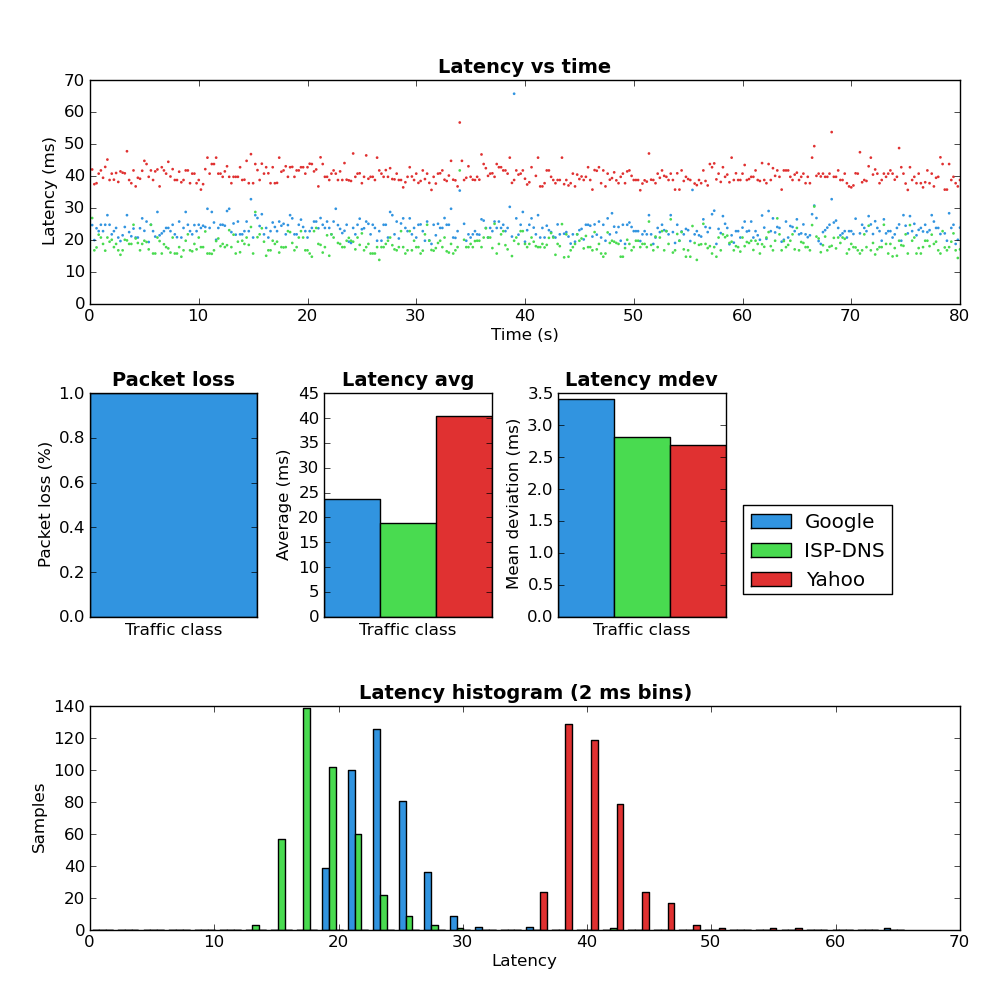
Ping-exp example
Links
Features
- Supports several simultaneous targets (eventually the charts get messy)
- Ability to control the IP TOS value.
- Ability to control the ICMP ping size.
- Ability to save the results to be viewed later.
- Ability to control the ping frequency and total number.
- Export to PNG.
- Interactive inspection (zooming) of the resulting charts (using the Matplotlib viewer).
Requirements
- Python 2.6 (makes use of the Multiprocessing module).
- Matplotlib
- Linux (tested on Fedora. Ping-exp relies on parsing ping’s output so it almost certainly won’t work on Windows – maybe other Unices)
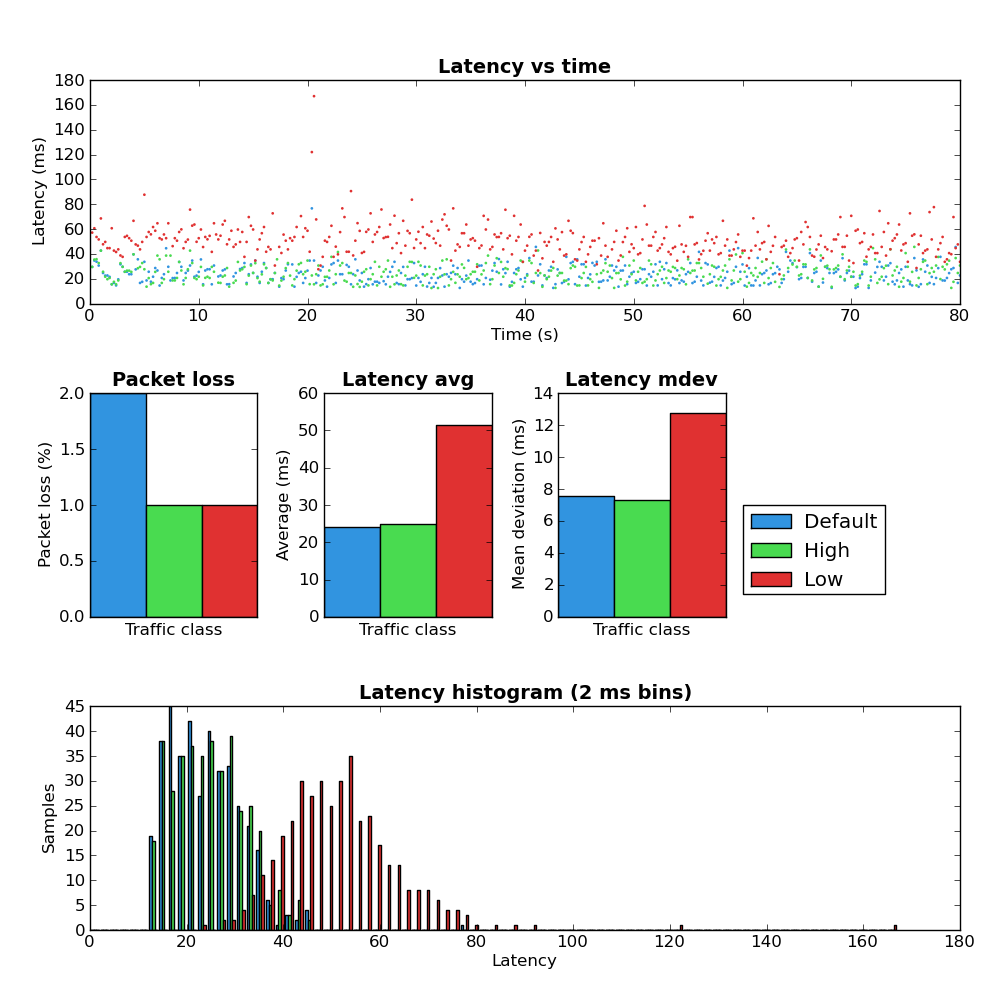
More Screenshots
Pingback: Network latency experiments | Dan Siemon
Pingback: Packet loss chart in Ping-exp | Dan Siemon
Hi Dan,
I get the following error when running the script, first I had to add 3 Targets as I get an error when only using 2.
I am using Ubuntu
Linux 2me-desktop 2.6.31-14-generic #48-Ubuntu SMP Fri Oct 16 14:04:26 UTC 2009 i686 GNU/Linux
./pingexp.py -t ITWeb,www.itweb.co.za,0 -t Google,www.google.com,0 -t Yahoo,www.yahoo.com,0 -i .2 -c 5 -o results.png
/usr/lib/python2.6/dist-packages/pytz/__init__.py:32: UserWarning: Module multiprocessing was already imported from /usr/lib/python2.6/multiprocessing/__init__.pyc, but /usr/lib/pymodules/python2.6 is being added to sys.path
from pkg_resources import resource_stream
Got results for ITWeb
Got results for Google
Got results for Yahoo
Traceback (most recent call last):
File “./pingexp.py”, line 505, in
graph(results, line_graph=line_graph, image_file=f)
File “./pingexp.py”, line 338, in graph
canvas.print_png(image_file)
File “/usr/lib/pymodules/python2.6/matplotlib/backends/backend_agg.py”, line 358, in print_png
FigureCanvasAgg.draw(self)
File “/usr/lib/pymodules/python2.6/matplotlib/backends/backend_agg.py”, line 314, in draw
self.figure.draw(self.renderer)
File “/usr/lib/pymodules/python2.6/matplotlib/artist.py”, line 46, in draw_wrapper
draw(artist, renderer, *kl)
File “/usr/lib/pymodules/python2.6/matplotlib/figure.py”, line 774, in draw
for a in self.axes: a.draw(renderer)
File “/usr/lib/pymodules/python2.6/matplotlib/artist.py”, line 46, in draw_wrapper
draw(artist, renderer, *kl)
File “/usr/lib/pymodules/python2.6/matplotlib/axes.py”, line 1721, in draw
a.draw(renderer)
File “/usr/lib/pymodules/python2.6/matplotlib/artist.py”, line 46, in draw_wrapper
draw(artist, renderer, *kl)
File “/usr/lib/pymodules/python2.6/matplotlib/patches.py”, line 298, in draw
gc.set_foreground(self._edgecolor)
File “/usr/lib/pymodules/python2.6/matplotlib/backend_bases.py”, line 628, in set_foreground
self._rgb = colors.colorConverter.to_rgba(fg)
File “/usr/lib/pymodules/python2.6/matplotlib/colors.py”, line 352, in to_rgba
raise ValueError(‘to_rgba: Invalid rgba arg “%s”\n%s’ % (str(arg), exc))
ValueError: to_rgba: Invalid rgba arg “[‘#3194e0’, ‘#49db50’, ‘#e03131’]”
invalid literal for float(): #3194e0
Hello Jacques,
I can’t reproduce your error with two or three destinations. What version of Matplotlib and Python do you have?
Pingback: Linux flow classifier proto-dst and TOS | Dan Siemon
Pingback: Making the Linux flow classifier tunnel aware | Dan Siemon
Hello,
I work for a company that makes a commercial traffic shaper. I am finding your tool an excellent way to experiment and plot different configurations. Thanks for the wonderful tool!
Great. Glad to hear it’s useful.
Pingback: Latency at my local Starbucks | Dan Siemon
Been looking for a tool like this for a while
thanks
Just wondering if this will work with pinging ipv6 addresses also
Unfortunately, no. It only knows how to call the ping command not ping6.
Hi Dan,
Same error like Jacques…
root@learning:~/ping-exp-HEAD-92ca1bb# python pingexp.py -t Google,www.google.com,0 -t Yahoo,www.yahoo.com,0 -c 10 -i .9 -l -o teste.png
/usr/lib/pymodules/python2.6/matplotlib/__init__.py:835: UserWarning: This call to matplotlib.use() has no effect
because the the backend has already been chosen;
matplotlib.use() must be called *before* pylab, matplotlib.pyplot,
or matplotlib.backends is imported for the first time.
if warn: warnings.warn(_use_error_msg)
Got results for Google
Got results for Yahoo
/usr/lib/pymodules/python2.6/matplotlib/axes.py:7069: UserWarning: 2D hist should be nsamples x nvariables; this looks transposed
warnings.warn(‘2D hist should be nsamples x nvariables; ‘
Traceback (most recent call last):
File “pingexp.py”, line 507, in
graph(results, line_graph=line_graph, image_file=f)
File “pingexp.py”, line 340, in graph
canvas.print_png(image_file)
File “/usr/lib/pymodules/python2.6/matplotlib/backends/backend_agg.py”, line 358, in print_png
FigureCanvasAgg.draw(self)
File “/usr/lib/pymodules/python2.6/matplotlib/backends/backend_agg.py”, line 314, in draw
self.figure.draw(self.renderer)
File “/usr/lib/pymodules/python2.6/matplotlib/artist.py”, line 46, in draw_wrapper
draw(artist, renderer, *args, **kwargs)
File “/usr/lib/pymodules/python2.6/matplotlib/figure.py”, line 773, in draw
for a in self.axes: a.draw(renderer)
File “/usr/lib/pymodules/python2.6/matplotlib/artist.py”, line 46, in draw_wrapper
draw(artist, renderer, *args, **kwargs)
File “/usr/lib/pymodules/python2.6/matplotlib/axes.py”, line 1735, in draw
a.draw(renderer)
File “/usr/lib/pymodules/python2.6/matplotlib/artist.py”, line 46, in draw_wrapper
draw(artist, renderer, *args, **kwargs)
File “/usr/lib/pymodules/python2.6/matplotlib/patches.py”, line 298, in draw
gc.set_foreground(self._edgecolor)
File “/usr/lib/pymodules/python2.6/matplotlib/backend_bases.py”, line 628, in set_foreground
self._rgb = colors.colorConverter.to_rgba(fg)
File “/usr/lib/pymodules/python2.6/matplotlib/colors.py”, line 353, in to_rgba
raise ValueError(‘to_rgba: Invalid rgba arg “%s”\n%s’ % (str(arg), exc))
ValueError: to_rgba: Invalid rgba arg “[‘#3194e0’, ‘#49db50’]”
need more than 2 values to unpack
Bogdan, can you please forward your matplotlib and python version information?